
You have already broken the task down. The first step looks small on paper. You still do not start.
That does not automatically mean the goal is wrong or that you need a more complicated planning method. The written first step may still contain several decisions, objects, or uncomfortable unknowns. Shrink the point of contact before shrinking the whole goal.
Check what the “first step” is hiding
Read the step literally. “Open the proposal” sounds like one action, but it may require you to find the current file, choose between versions, remember the client’s last comment, and face a section you do not know how to revise.
A first step is often still too large when it contains one of these:
- Setup: the right object, file, room, or login is not ready.
- Choice: you must decide where, when, which version, or what standard to use.
- Uncertainty: the step begins with a question you cannot yet answer.
- Exposure: opening the task also opens a difficult message, number, or unfinished result.
- No clean exit: starting feels like agreeing to finish the entire thing.
Do not solve every hidden issue at once. Choose the smallest contact that reveals what is actually blocking movement.
Move down the Contact-Step Ladder
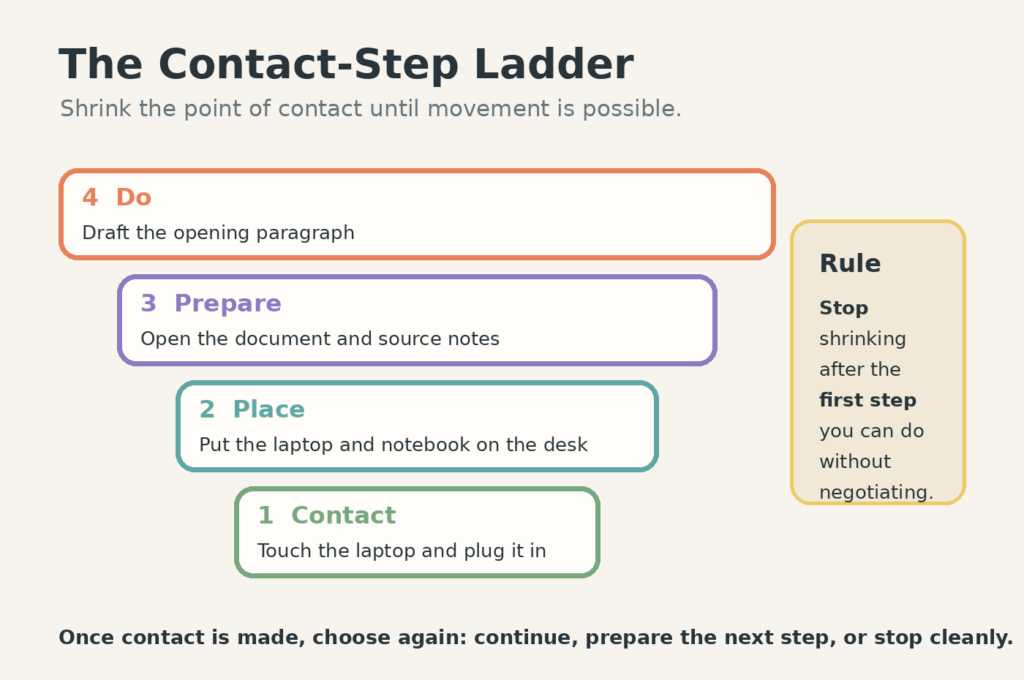
The ladder has four levels:
- Do: perform the first useful action in the task.
- Prepare: open or gather what the action needs.
- Place: move the necessary object into the place where the task can happen.
- Contact: touch, view, plug in, unlock, or name one part of the task.
Stop moving down when you reach a step you can do without another negotiation. The lowest level is not better. It is simply cheaper to enter.
Use four reliable contact moves
Open
Open the file, drawer, email thread, form, cupboard, or tool. Do not promise to work on it yet. Opening turns an imagined task into visible material.
Place
Put the shoes by the door, the pan on the stove, the document beside the laptop, or the return parcel in the walking path. Placement lets the environment hold the reminder.
Name
Write the exact question you need to answer: “Which number is missing?” “What does the client need to approve?” “Which surface must be clear for dinner?” A named unknown is easier to route than a vague feeling that the task is difficult.
Preview
Look at the first page, play the first ten seconds, scan the headings, or read the last handoff note. Previewing is useful when the task feels larger in memory than it looks in front of you.
Work one example from task to contact
Suppose the task is “finish the monthly report.” The stated first step is “draft the opening paragraph,” but nothing happens.
Move down:
- Do: draft the opening paragraph.
- Prepare: open the report and last month’s source notes.
- Place: put the laptop and notebook on the desk.
- Contact: plug in the laptop and touch the report folder.
After contact, choose again. You may open the folder, discover that the file name is unclear, and rename the correct version. That is real progress because tomorrow’s entry point is now cleaner. You may also continue into the paragraph. Continuing is optional; leaving a visible next step is not.
Pair the step with a visible cue
An if-then plan connects a situation with a prepared action: “When I put my coffee on the desk, I will open the report folder.” Research on implementation intentions finds that specific cue-and-action plans can help people translate an existing intention into action, especially when getting started is the problem. The cue does not create motivation or remove a real constraint; it makes the prepared response easier to recognize. The US National Cancer Institute summarizes the evidence and important conditions for implementation intentions.
Choose a cue that already occurs and an action that is genuinely small. “When I feel motivated, I will finish the report” is neither specific nor reliable.
Use a three-minute entry test
Give the contact step up to three minutes. During that time, your only job is to make the task more enterable.
- If movement begins, continue for a bounded block or stop after leaving a handoff.
- If you discover a missing input, write who or what must provide it.
- If the step still produces negotiation, move down one level.
- If the task is unsafe, inappropriate, or no longer yours, stop and route it instead of forcing initiation.
A timer can bound this experiment, but it should not turn three minutes into a test of character. The purpose is diagnosis: find the smallest step that changes the task from imagined to present.
Fit the task to the capacity you have
Sometimes the contact step works, but the planned task still does not fit the day. Move the task into the correct lane using the Capacity Day Planner or the fuller guide to planning with unpredictable energy.
A low-capacity version of “prepare the presentation” might be gathering the three required metrics and placing them in one folder. That preserves the project without pretending a full analysis block is available.
Leave before the next start becomes expensive
If you stop after contact or preparation, write the next visible action in the file, on the object, or in the place where work will resume. The task-handoff method is useful when another commitment interrupts you.
The goal is not to trick yourself into completing a large task. It is to remove the hidden work from the doorway, make contact with what is real, and preserve a clean way back in.
Free GentleDone resource
Overwhelmed? Start with 10 minutes.
The GentleDone 10-Minute Reset gives you one deliberately small place to begin.