

A visual timer should make the remaining block easier to notice. If setting it requires repeated button presses, the alert is wrong for the room, or the display cannot be seen from where the work happens, the timer becomes another small task.
This comparison uses official manufacturer specifications and US list prices checked on 14 August 2026. Prices, colors, and availability can change. GentleDone did not conduct hands-on durability or sound testing for this guide.
Disclosure: The links below currently go directly to the manufacturer and are not affiliate links. If monetized links are added later, the page must be updated with the required disclosure.
Compare the friction before the features
Five differences usually matter more than the color of the disk:
- Visibility: Can you read the remaining time from your actual working distance?
- Range: Do you need short transitions, a 60-minute block, or up to 90 minutes?
- Controls: Is a simple dial enough, or will interruptions make a pause control useful?
- Sound: Do you need silent operation, an optional alert, variable volume, or a persistent alert?
- Placement: Will the timer stay on a desk, move between rooms, attach to a metal surface, or travel in a bag?
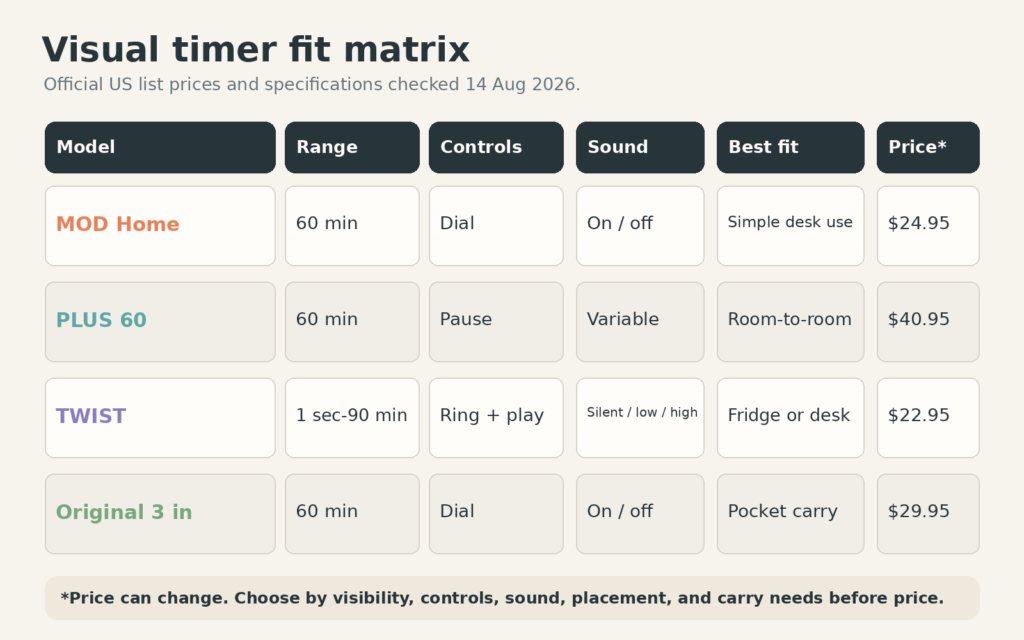
Four current options
| Model | Useful distinction | Official US price* |
|---|---|---|
| Time Timer MOD Home | Compact 60-minute analog desk timer | $24.95 |
| Time Timer PLUS 60 | Pause, handle, and variable volume | $40.95 |
| Time Timer TWIST | Digital, magnetic, 1 second to 90 minutes | $22.95 |
| Time Timer Original 3-inch | Pocket-sized analog timer with protective cover | $29.95 |
*Prices shown on the manufacturer’s US pages when checked. Verify the current price and stock before buying.
Time Timer MOD Home: simple desk visibility
The Time Timer MOD Home Edition is a compact 3.6-inch, 60-minute analog visual timer. The manufacturer describes silent operation with an alert that can be switched on or off. It is designed to stay visible on a desk or nearby surface without taking much room.
Best fit: you want a simple dial, a compact desktop footprint, and no pause or multi-button setup.
Trade-off: the Home Edition page showed the product as sold out when checked. Availability can change, and this model does not provide the PLUS model’s pause or carry handle.
Time Timer PLUS 60: pause and room-to-room carry
The Time Timer PLUS 60 combines a 60-minute analog disk with a pause button, built-in handle, and variable volume. The manufacturer lists a size of 7.09 by 1.7 by 5.51 inches and two AA batteries.
Best fit: the timer moves between rooms, interruptions are common, or you need more control over alert volume.
Trade-off: it is larger and had the highest official list price in this comparison. A pause button is helpful only if you will actually resume the same block rather than letting paused time disappear.
Time Timer TWIST: flexible range and magnetic placement
The Time Timer TWIST with Kickstand is digital. The outer ring sets durations from one second through 60 seconds, then from one minute through 90 minutes. It has a magnetic back, an integrated kickstand, a flashing visual alert, and silent, low, or high sound settings. The audible alert continues until stopped or until one minute has passed.
Best fit: you want to move between a refrigerator, file cabinet, whiteboard, and desk, or you need a duration that is not limited to a fixed 60-minute face.
Trade-off: the digital interaction is slightly different from turning a single analog disk, and the persistent alert may be more than you want in a shared room unless sound is disabled.
Time Timer Original 3-inch: pocket carry
The Time Timer Original 3-inch is a compact 60-minute analog timer. Its clear cover protects the face and folds back as a stand. The manufacturer includes a dry-erase activity card and describes an optional end alert.
Best fit: the timer needs to travel in a bag, sit close to one person, or support a written label for the current block.
Trade-off: the smaller face is easier to carry but less visible from across a room.
Choose by the job the timer must do
- Choose MOD Home for a compact, simple analog timer that stays on one desk.
- Choose PLUS 60 when pause, carry, and volume control are worth the extra size and cost.
- Choose TWIST for magnetic placement, a 90-minute range, or a persistent visual and audible finish.
- Choose Original 3-inch when portability matters more than across-the-room visibility.
Before buying, place a paper square where the timer would sit. Step back to your normal working position. If a small face would be hard to notice, choose a larger display rather than a more portable one.
When no dedicated timer is the better choice
Use a phone or computer timer if you only need an occasional alert, already keep the device visible, and can start the timer without opening distracting apps. A dedicated timer is most useful when it reduces setup, keeps time visible, or removes the phone from the task.
A timer also cannot fix a task that has no enterable first step. Use the Contact-Step Ladder first, then time a bounded work block. If the day itself has changed, choose the block from the Capacity Day Planner.
Use the timer without turning it into pressure
Name the job before setting the duration: “preview the document,” “clear the sink route,” or “draft until the next heading.” When the timer ends, choose among stop, continue deliberately, or leave a handoff. Do not let the sound make the decision automatically.
If you switch tasks, preserve the next action with the task-handoff method. The best timer is the one that makes the block visible without making the system louder than the work.
Free GentleDone resource
Overwhelmed? Start with 10 minutes.
The GentleDone 10-Minute Reset gives you one deliberately small place to begin.