

An overloaded inbox creates two different problems at once. There may be messages that need action, and there is a large number on the screen making every message feel equally urgent. Trying to “catch up” mixes those problems together.
Triage has a smaller goal: find what can still change an outcome, decide what each important message means, and contain the rest. You do not need inbox zero before you can trust your email again.
Protect a short triage window
Set a timer for 20 minutes. Close chat, silence new-mail alerts, and keep only email plus your calendar or task list open. The timer prevents the session from turning into an unplanned afternoon of replies.
There is good reason to reduce email’s constant presence while doing focused work. In a small field study of 13 information workers, five days without email was associated with less multitasking and longer focus within computer windows. That study does not mean everyone should abandon email; it supports creating boundaries around when you process it. You can read the University of California, Irvine paper, “A Pace Not Dictated by Electrons”.
Search for consequence, not completeness
Do not begin by scrolling from the oldest unread message. Use search to surface categories where delay has a cost. The exact search language differs by email service, but the sequence is portable:
- People: search for your manager, client, school, landlord, doctor’s office, or anyone waiting on a decision.
- Dates: search “deadline,” “due,” “appointment,” “renewal,” “expires,” and the names of the next two months.
- Money and access: search “invoice,” “receipt,” “payment,” “password,” “verification,” and “account.”
- Attachments: review messages with documents you expected to receive or send.
Star or flag only the messages that survive this pass. The aim is a small decision queue, not a new pile of 200 marked messages.
Give each important message one destination
Open the flagged messages one at a time. Decide where the obligation belongs after you close the email.
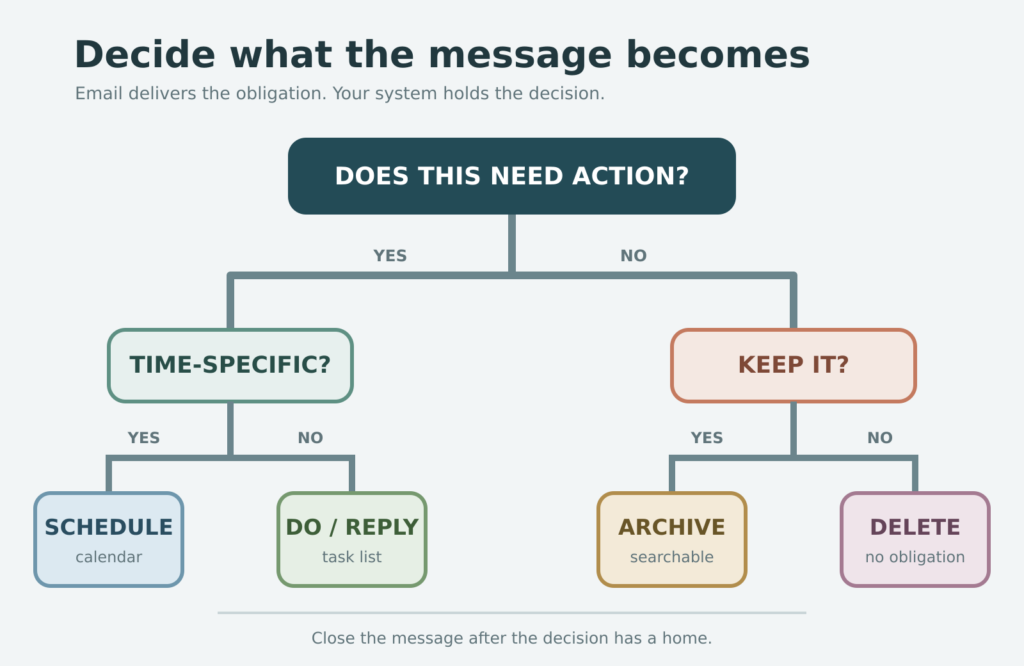
- Reply: send it now only if the answer is clear and genuinely short.
- Do: put the next physical or digital action on your task list, with enough detail to begin.
- Schedule: put time-specific commitments on the calendar.
- Wait: record whom you are waiting for and when you will follow up.
- Archive or delete: remove anything that carries no obligation.
Do not leave a message in the inbox as the only reminder of work. Email is a delivery channel; your task list and calendar are better places to see commitments together.
Use a careful lane for suspicious messages
Urgency language can be legitimate, but it is also used in phishing. If a message unexpectedly asks you to open an attachment, provide sensitive information, make a payment, or sign in through a link, pause the triage process.
Verify the request through a known contact method or by opening the organization’s site yourself. Follow your workplace reporting process when applicable. CISA’s recognize-and-report guidance recommends reporting suspicious messages and deleting them rather than interacting with them.
Contain the backlog without reviewing every message
Once consequence searches are complete, draw a date line. Create a folder or label such as “Older inbox — before August 2026,” then move messages older than a date you can realistically review. This is not deletion, and it is not a promise to read them all later. It removes old volume from the active decision surface while keeping it searchable.
Leave recent mail in place for the next few triage sessions. If an old obligation matters, it is likely to reappear through a follow-up, a calendar date, a person search, or one of the consequence searches.
Close the session with a handoff
Stop when the timer ends. Before closing email, write one line:
Next inbox pass: continue with [search, person, or flagged message].
This keeps the next session from beginning with another broad scan. The same handoff method is useful whenever you need to switch tasks without losing the next step.
Choose a maintenance rhythm you can repeat
After the first rescue session, choose one or two daily email windows. For example, process email after your first focused block and again before the last hour of work. Roles that depend on rapid response may need shorter intervals; the boundary should match real obligations, not someone else’s ideal schedule.
During each window:
- Check the small decision queue.
- Process new mail into reply, do, schedule, wait, or archive.
- Update the handoff line.
- Close email and turn alerts back off.
When the inbox starts swelling again
| Signal | Response |
|---|---|
| You reread the same messages | Move the obligation to a task, calendar event, or waiting list. |
| Newsletters hide personal mail | Unsubscribe during a separate five-minute pass; do not mix it into urgent triage. |
| Everything is flagged | Clear flags, then mark only items with a consequence or promised response. |
| Email remains open all day | Choose the next processing time, close the tab, and rely on real emergency channels. |
A trustworthy inbox is not an empty one. It is an inbox where important messages become explicit decisions and old volume no longer controls what you see first.
Free GentleDone resource
Overwhelmed? Start with 10 minutes.
The GentleDone 10-Minute Reset gives you one deliberately small place to begin.