

You stop halfway through a task for a meeting, an urgent message, school pickup, or the end of the day. When you return, the file is open but the thinking is gone. You reread, reconstruct, and try to remember which choice you had just made.
A short handoff note preserves that context. It does not eliminate the cost of switching tasks, but it gives your future self a marked trail back into the work.
Leave four facts, not a progress report
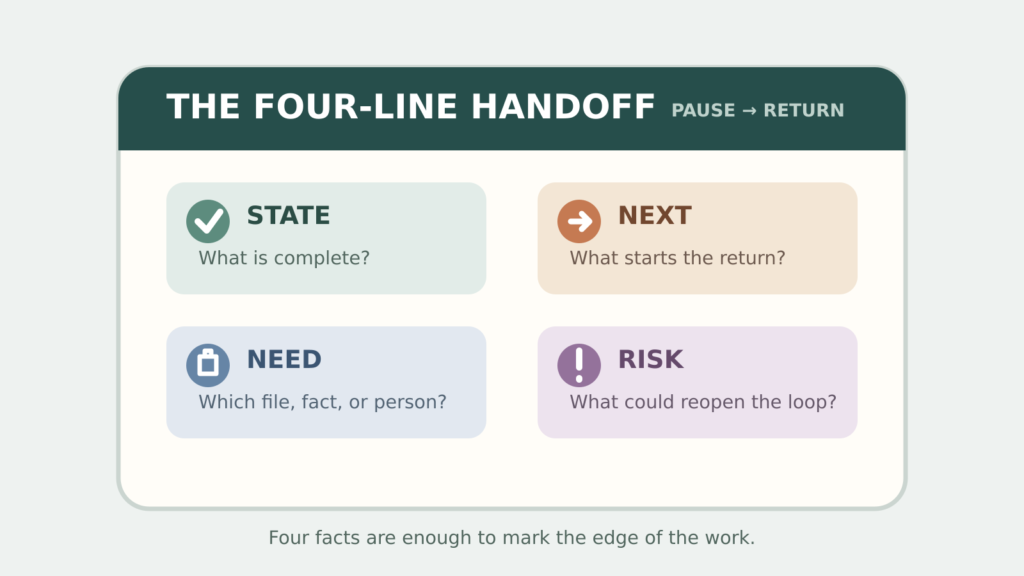
Before switching, capture four things:
- State: what has just been completed.
- Next: the first visible action when you return.
- Need: the file, person, decision, or information required.
- Risk: the open question most likely to pull you back into rethinking.
Keep it to four lines. A long summary becomes another document to maintain. The handoff is useful because it records the edge of the work while you can still see it.
State: compared the three venue quotes.
Next: enter cancellation terms in the comparison sheet.
Need: West Hall contract, page 4.
Risk: Tuesday access time is still unconfirmed.
Make “next” physically startable
“Continue report” is not a handoff. It forces you to rediscover the starting point. Write an action you can see yourself perform:
- open the survey results and sort column H;
- write the paragraph that explains the price change;
- call Maya to confirm the delivery window;
- test the login on a private browser window.
If you cannot name the next action, write the decision that is blocking it: “Choose whether the guide is for new or returning customers.” That still protects the true edge of the task.
Use a 90-second shutdown
When a planned switch is approaching, stop adding new work and run this sequence:
- Save the current file.
- Write the four-line handoff.
- Put the handoff where the task will reopen—at the top of the document, in the task note, or on a paper clipped to the folder.
- Close extra tabs that do not belong to the next task.
- Choose when you will return, if that is known.
Laboratory research reviewed by Stephen Monsell found that people are typically slower and more error-prone immediately after switching tasks. Preparation reduces this switch cost but does not remove it. The practical conclusion is modest: give transitions some room rather than expecting the next task to begin at full speed. See the review on task switching.
Handle an interruption in one sentence
Some switches do not allow 90 seconds. When interrupted, leave a single line before moving:
When I return, I will ______ using ______.
Examples: “When I return, I will check the totals using the April export,” or “When I return, I will answer the second customer question using the refund policy.”
If even that is impossible, mark the exact spot: highlight the unfinished sentence, place the cursor in the next field, or leave the needed object on top. A physical marker is better than trusting yourself to reconstruct the moment later.
Prevent attention from following the old task
Sophie Leroy’s experiments on attention residue found that unfinished prior work can make it harder to fully shift attention to a subsequent task. The study does not directly test handoff notes, so a note should be treated as a practical containment method rather than a proven cure. Read the paper abstract on attention residue between work tasks.
After writing the handoff, make the transition visible:
- stand up and take one breath before opening the next task;
- close the old project window rather than leaving it in front of you;
- state the new task’s first action out loud or write it at the top of your note;
- keep a separate waiting list for questions you cannot resolve now.
For a large digital queue, the same rule applies: convert messages into decisions during a bounded email triage session, then leave email before starting the next block.
Return by reading the note before the work
When you come back, do not immediately scan the whole project. Read the handoff and perform the “next” line. Only reopen background material if the action requires it.
A specific plan for unfinished work reduced cognitive intrusion in experiments by Masicampo and Baumeister. That finding supports making the return route concrete, while stopping short of promising that a note will clear every lingering thought. See the study on planning for unfulfilled goals.
Repair the handoff when it stops helping
| Handoff problem | Better version |
|---|---|
| The note says “keep working” | Name the next observable action and the file or object involved. |
| Notes are scattered | Store each handoff inside the task’s normal home. |
| You write too much | Return to State, Next, Need, and Risk. |
| You never schedule the return | Add a calendar block or place the task in the next weekly review. |
| Every message triggers a switch | Batch non-urgent checks and define the real emergency channel. |
Try it on the next ordinary interruption
Do not wait for a major project. Before lunch, a meeting, or the end of today, leave one four-line handoff. When you return, notice whether you can begin from the “next” line without rebuilding the whole context.
The goal is not seamless multitasking. It is a cleaner stop and a kinder restart: enough information for the next version of you to continue without guessing.
Free GentleDone resource
Overwhelmed? Start with 10 minutes.
The GentleDone 10-Minute Reset gives you one deliberately small place to begin.