

You open a browser to finish one task. Fifteen minutes later, the tab row contains the task, six possible references, a message you should answer, a product you may buy, and three pages you are afraid to lose. The tabs are no longer supporting the work. They have become a queue with no order.
The One-Tab Rule is a way to restore a foreground. It does not mean complex work may use only one webpage. It means only one action-owning page remains visible at a time, while references and obligations have named places to wait.
Define the tab that owns the next action
The action tab is the place where the work changes. It may be a document being revised, a form being submitted, a spreadsheet being checked, or the page where a decision will be recorded. Ask:
If I could keep only one window visible for the next ten minutes, where would I make progress?
That window becomes the foreground. A supporting source can appear while you use it, then return to its reference group. A message can be captured without opening the entire inbox. The rule is about ownership, not purity.
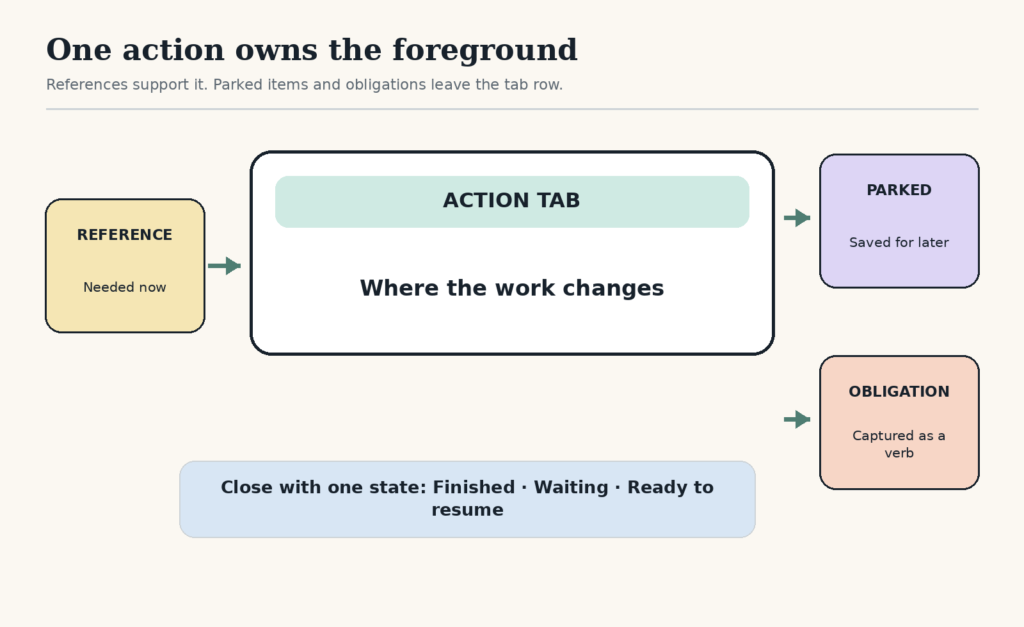
Give every other tab one of three destinations
- Reference: needed for the current action. Keep it in the same named window or tab group.
- Parked: potentially useful later. Save it to a specific reading or project list, then close it.
- Obligation: contains a task, reply, purchase, or decision. Write the action in the appropriate task or waiting system, then close it.
“Keep open so I remember” is not a destination. It asks the browser to be memory, task list, reading list, and project manager at the same time.
Run the 60-second tab reset
When the tab row is already crowded, do not inspect every page deeply. Use a fast pass:
- identify the page that owns the current action;
- move immediately needed sources beside it;
- capture obvious obligations as verbs, not links;
- bookmark or save genuine later references to a named place;
- close duplicates, expired searches, and pages you would not choose again.
If a tab takes more than a few seconds to classify, place its URL in a temporary “unsorted tabs” note and close it. Review that note at a scheduled time. The reset should return you to work, not become a history project.
Use a small reference budget
Some tasks genuinely require comparison. Give the task a reference budget: perhaps three candidate products, five sources, or two examples. When the budget fills, decide whether the next source will replace an existing one or whether the question itself needs to change.
This protects against a common research loop: each new page changes the standard for enough evidence. The limit is not a claim that three sources are universally sufficient. It is a decision rule you can deliberately expand when the stakes justify more research.
| Work type | Action tab | Supporting context |
|---|---|---|
| Write a proposal | The proposal document | Pricing sheet and one source group |
| Submit an application | The application form | Résumé and required records |
| Compare a purchase | The comparison note | A bounded set of official product pages |
| Fix a website issue | The code or admin screen being changed | Error log and one relevant reference set |
Close with a restart state
Before you end the session, leave the action tab in one of three states:
- finished: the output is saved, sent, or submitted;
- waiting: the blocked item and follow-up date are on a waiting list;
- ready to resume: a one-sentence next action sits at the top of the document or in a visible note.
Research on task switching describes how thoughts about unfinished work can persist after a transition, a phenomenon called attention residue. A separate study found that making a brief ready-to-resume plan can help people disengage from an interrupted task. The evidence comes from particular study settings and does not show that every transition becomes easy. It supports a modest practice: record the state of the work before closing it. See the attention-residue research and the ready-to-resume research.
Know when not to use the literal rule
Do not force one literal browser tab when the task requires live monitoring, accessibility tools, a side-by-side comparison, or multiple documents. Use one work context instead: one desktop, one window group, or one project space. Also keep required safety, support, or communication channels available when the consequences of silence are high.
If interruptions, rather than tabs, are the main problem, use the focus-block interruption guide. If you regularly stop mid-task, pair the rule with a visible next-step handoff.
The aim is not an empty browser. It is a browser that tells the truth about what you are doing now, what supports it, and what can safely wait.
Free GentleDone resource
Overwhelmed? Start with 10 minutes.
The GentleDone 10-Minute Reset gives you one deliberately small place to begin.