
A closed door and a silent phone do not solve every interruption. A client issue may be real. A child may need you. A coworker may be waiting on a two-minute answer before several people can continue. The practical question is not how to block everyone. It is how to distinguish an interruption that deserves access from one that needs a reliable place to wait.
Write an interruption policy for one block
Before beginning, write four lines:
- Block: what you are working on and when you will stop.
- Interrupt now: the specific conditions that may break the block.
- Capture here: where ordinary requests will be placed.
- Next check: when you will review that place.
For example: “Draft the recommendation until 10:45. Interrupt for safety, production outage, or a same-day legal deadline. Put other requests in the team queue. I will check it at 10:45.”
Define urgency with consequences, not emotion
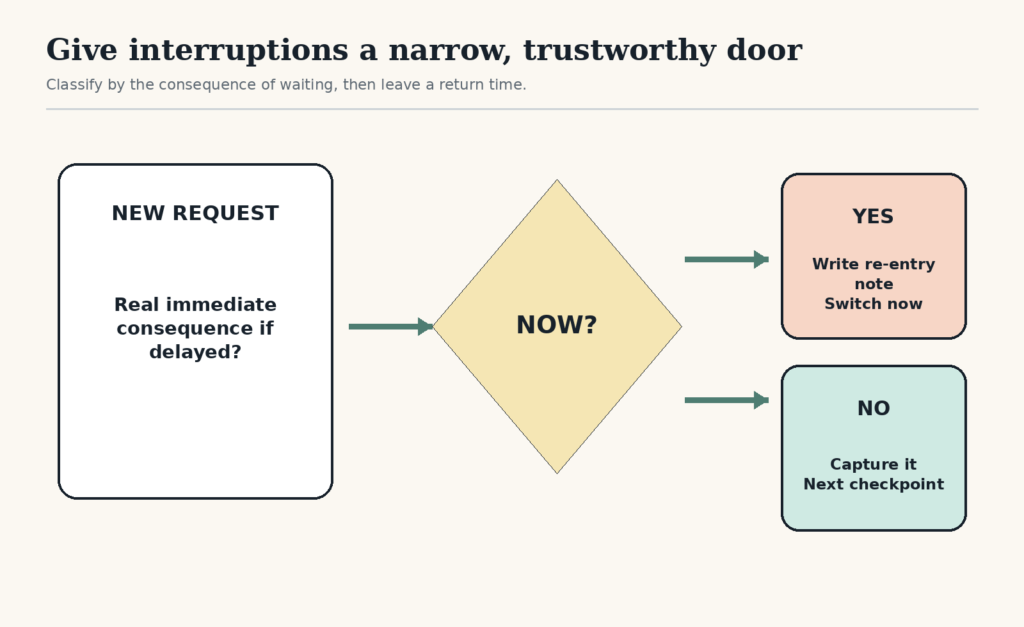
“Urgent” often means the sender is worried, the message is recent, or the notification is visually loud. A usable rule names the consequence of waiting. Consider immediate access when delay could create:
- a safety risk;
- irreversible loss or a missed hard deadline;
- an outage affecting other people’s ability to work;
- a care responsibility that cannot wait for the next checkpoint.
A request can be important without being interrupt-now important. “Please review today” can wait for the 10:45 checkpoint. “The public checkout is charging twice” probably cannot.
Give people a visible route around you
A focus boundary works better when other people know what to do. In a team, name one channel for urgent issues and one queue for ordinary requests. At home, use a concrete signal and a short time boundary: “I am available at 3:30; interrupt before then for injury, the door, or something that cannot safely wait.”
Do not make another person guess whether your block matters more than their need. The route should include both the exception and the next access point.
Move alerts out of the foreground
A laboratory study found that receiving a phone notification disrupted performance on an attention-demanding task even when participants did not interact with the device. The study does not establish the size of the effect for every person or every kind of work, but it supports treating alert delivery itself as an interruption. Read the original study.
Use the controls your devices already provide. Windows can schedule Do Not Disturb and allow selected calls, reminders, or apps as priorities; Apple Focus can allow chosen people and apps and run on a schedule; Android modes can filter people and apps and allow repeat callers. Confirm settings on your own devices because menus and exceptions change. See the official instructions for Windows, iPhone, and Android.
Keep safety alerts, accessibility tools, medical devices, care contacts, and required operational channels outside any generic silencing rule.
Use a two-minute landing for an actual interruption
When something does break through, do not rely on remembering where you were. Before switching, write:
- the last completed change;
- the exact next action;
- the object or information needed next;
- the earliest sensible return time.
A ready-to-resume plan has been studied as a way to reduce attention residue when work is interrupted. The finding does not mean a note removes the cost of every high-pressure interruption. It gives you a low-cost handoff when a transition is unavoidable. See the original research.
Run three different responses
| What arrives | Response | Protect before switching |
|---|---|---|
| Immediate consequence if delayed | Switch now | Write a re-entry note if the situation allows |
| Important but safe until checkpoint | Capture and acknowledge only if necessary | Keep the current task in the foreground |
| Idea, link, or nonurgent request | Park without processing | Do not open the new work |
Example: protecting a shared-office block
Em is preparing a payroll file from 9:30 to 10:15. Errors with today’s payroll and calls from the childcare center may interrupt immediately. Team questions go to a shared queue, and colleagues know Em will check it at 10:15. Email banners and chat previews are off; the payroll escalation channel remains allowed.
At 9:52, a colleague asks where last month’s template lives. The request is useful but safe to wait. It enters the queue. At 10:15, Em saves the file, writes “verify totals against bank report,” and answers the location question. The boundary protected both the focus work and the colleague’s route to an answer.
Adjust the system when interruptions keep winning
- If nearly everything qualifies as urgent, the definition is too broad or the work has a real staffing problem.
- If requests bypass the queue, the next checkpoint may be too far away or the route is not visible.
- If you check the queue constantly, close it and use a timer or calendar checkpoint.
- If returning is the main loss, shorten the block and strengthen the re-entry note.
For a wider system that includes task entry and short attention windows, use the Practical Focus System. The best focus block is not the one no one can reach. It is the one with a narrow, trustworthy door.
Free GentleDone resource
Overwhelmed? Start with 10 minutes.
The GentleDone 10-Minute Reset gives you one deliberately small place to begin.