
A plan can look sensible at 8:00 and become unusable by 11:30. A meeting runs over. The task that looked straightforward turns out to need a decision from someone else. Your available attention changes. The calendar stays fixed while the day underneath it does not.
A realistic planning system needs a way to absorb that change. The aim is not to predict the day perfectly. It is to keep the next useful decision visible when the original version of the day disappears.
A workable plan answers four questions before it assigns tasks
Start with the shape of the day rather than a complete inventory of everything you could do.
- What is fixed? Record appointments, deadlines, travel, care work, and other commitments that cannot simply slide.
- What capacity is actually available? Consider usable time, attention, physical effort, location, and access to other people—not just empty calendar space.
- What must move forward? Choose the smallest meaningful outcome that protects the day from becoming entirely reactive.
- What may disappear? Name the work you will deliberately drop if capacity falls. An unnamed fallback usually becomes a late-day negotiation.
These questions create a planning boundary. You can still keep a larger project list, but the day does not have to carry the whole list at once.
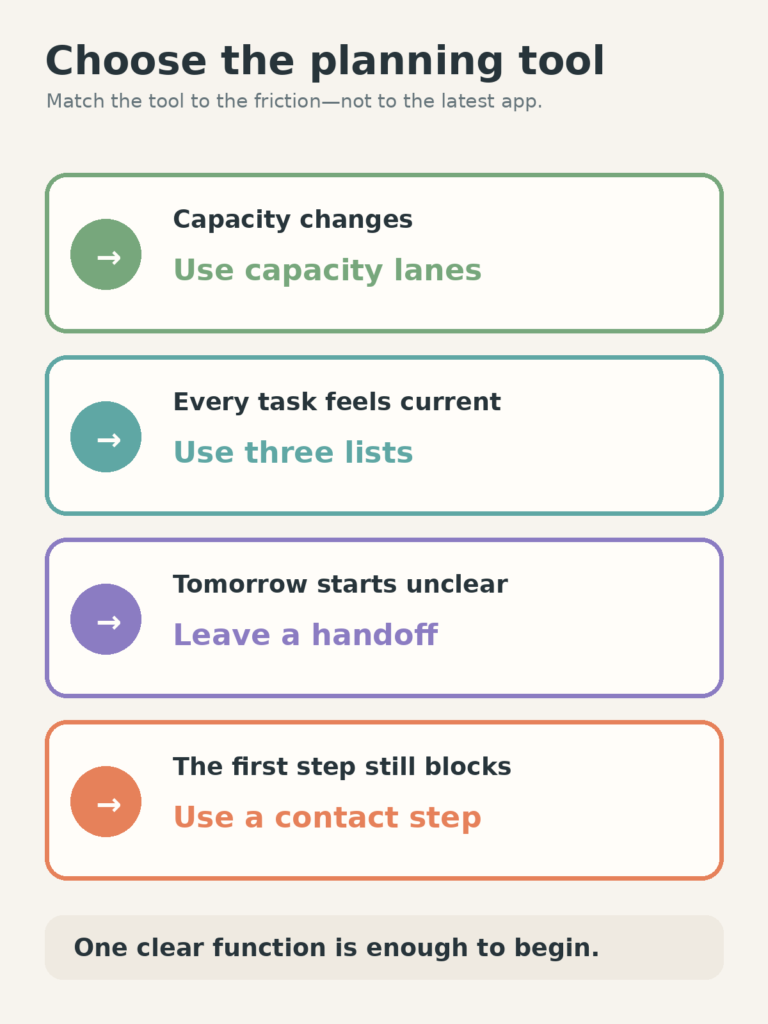
Use a different tool for a different planning failure
Planning systems often become complicated because one page is expected to solve every kind of problem. It helps to identify the exact friction first.
When the day’s capacity changes: use capacity lanes
The Free Capacity Day Planner gives the same day a Low, Normal, and High lane. You choose a lane after seeing the actual conditions instead of treating the fullest version as the default.
This works well when the commitments are known but the amount of usable effort is not. It is less useful when the real problem is a crowded master list with no boundaries.
When every task feels current: use Today, Soon, and Not Now
The Three-List Planning System separates current commitment from near-term visibility and deliberate deferral. Today stays small. Soon prevents useful work from disappearing. Not Now lets an idea remain recorded without repeatedly asking for attention.
Use it when one long list makes twenty unrelated items feel equally active.
When mornings begin with decisions: leave a tomorrow handoff
A five-minute handoff records one anchor, one first action, one constraint, and one fallback. The full method is in How to Plan Tomorrow in Five Minutes Before You Stop.
This is useful when you generally know what matters, but reopening the work takes too much interpretation.
When the first action still feels too large: reduce the contact step
If the plan says “work on the proposal” and you still avoid it, scheduling may not be the remaining problem. Use the Contact-Step method to define the first point of contact: open the file, place the document beside you, name the missing decision, or preview the next section.
A smaller entry point does not shrink the whole project. It only reduces the cost of finding out what the next real action is.
The smallest complete planning stack has four layers
You do not need four apps. The layers can live on one sheet, in a notes app, or across tools you already use.
- Calendar: holds work that must happen at or before a specific time.
- Three lists: holds current, near-term, and deferred work without making all of it compete.
- Today surface: selects the lane, protected minimum, and one meaningful outcome for the actual day.
- Handoff: leaves enough context for the next start or transition.
Project notes, reference material, and someday ideas can sit outside this stack. They are useful storage, but they should not automatically become daily commitments.
Recalibrate instead of rebuilding when capacity changes
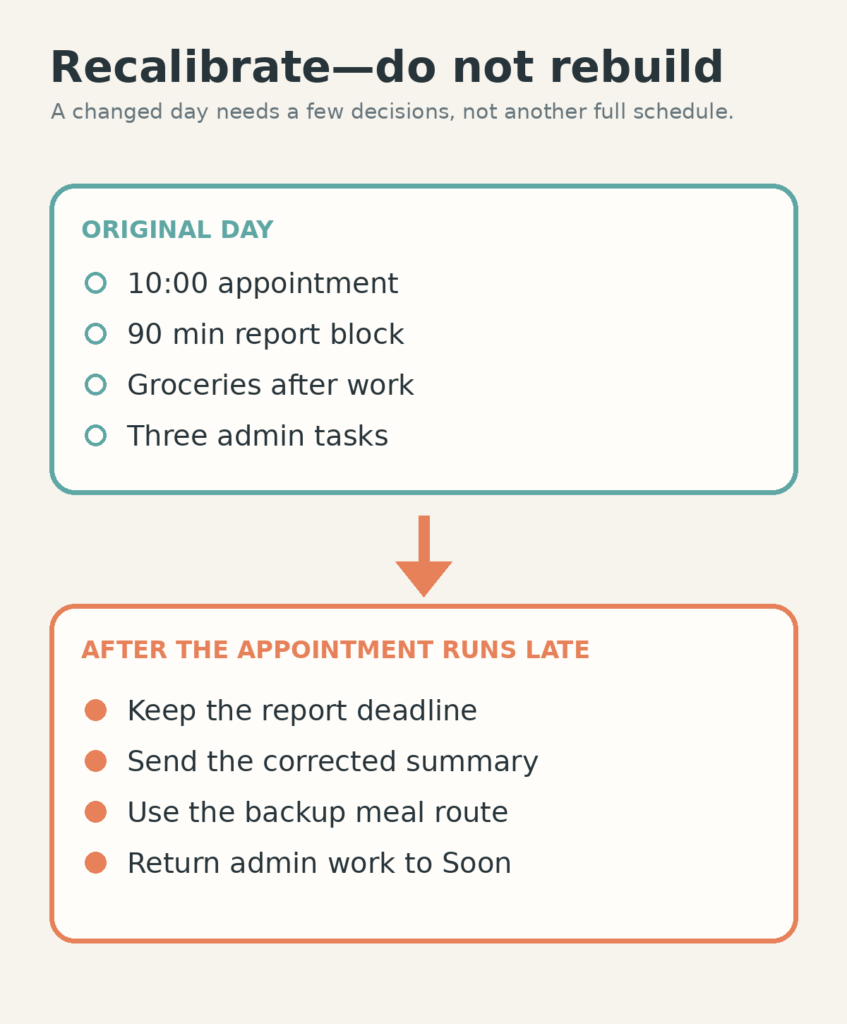
Suppose Tuesday contains a 10:00 appointment, a report due by 16:00, groceries, and three smaller administrative tasks. The morning plan gives the report a 90-minute block and places groceries after work.
The appointment runs an hour late. Rebuilding the entire day is unnecessary. Keep the fixed report deadline, reduce its outcome to “send the corrected summary and flag the two open figures,” move groceries to the fallback meal route, and return the administrative tasks to Soon. The plan changes in four decisions rather than another round of scheduling.
This is the important distinction: recalibration protects what still matters without pretending the missing time remains available.
Urgency and importance still need a capacity check
Labels such as urgent and important do not tell you whether a task fits the current conditions. Add one more question: Can this move meaningfully with the capacity I have?
- Important and possible now: protect a concrete outcome.
- Important but blocked: create the request, decision, or handoff that unblocks it.
- Urgent but too large: identify the smallest risk-reducing action and communicate the remaining limit.
- Neither urgent nor currently useful: move it out of Today without repeatedly reconsidering it.
Capacity is not permission to ignore real obligations. It is information for choosing the most responsible version that can actually be completed.
Watch for planning systems that create hidden work
A planning tool is becoming another project when you regularly spend more time reorganizing tasks than clarifying or completing them. Other warning signs include recopying unfinished work every evening, creating categories you rarely use, scheduling the same task repeatedly, and keeping a Today list that is really a master list with a different heading.
Reduce the system before abandoning it. Remove decorative fields. Keep one home for each layer. Let overdue items return to Soon until you choose them again; do not make every missed item carry debt into tomorrow.
Restart from the current day, not the abandoned plan
If you have not used the system for a week, do not reconstruct seven missing days. Capture current fixed commitments, choose one Today outcome, and place everything else in Soon or Not Now. Add a handoff only when you stop.
The next useful planning system is the one that solves today’s pressure point. Choose capacity lanes for an uncertain day, three lists for competing tasks, a handoff for a difficult restart, or a contact step for a task you cannot enter. One clear function is enough to begin.