

A single task list is useful for capture and poor at showing commitment. A bill due tomorrow, a book you may read, a project waiting for feedback, and “replace the hallway bulb” can appear as four equal lines even though they ask for completely different decisions.
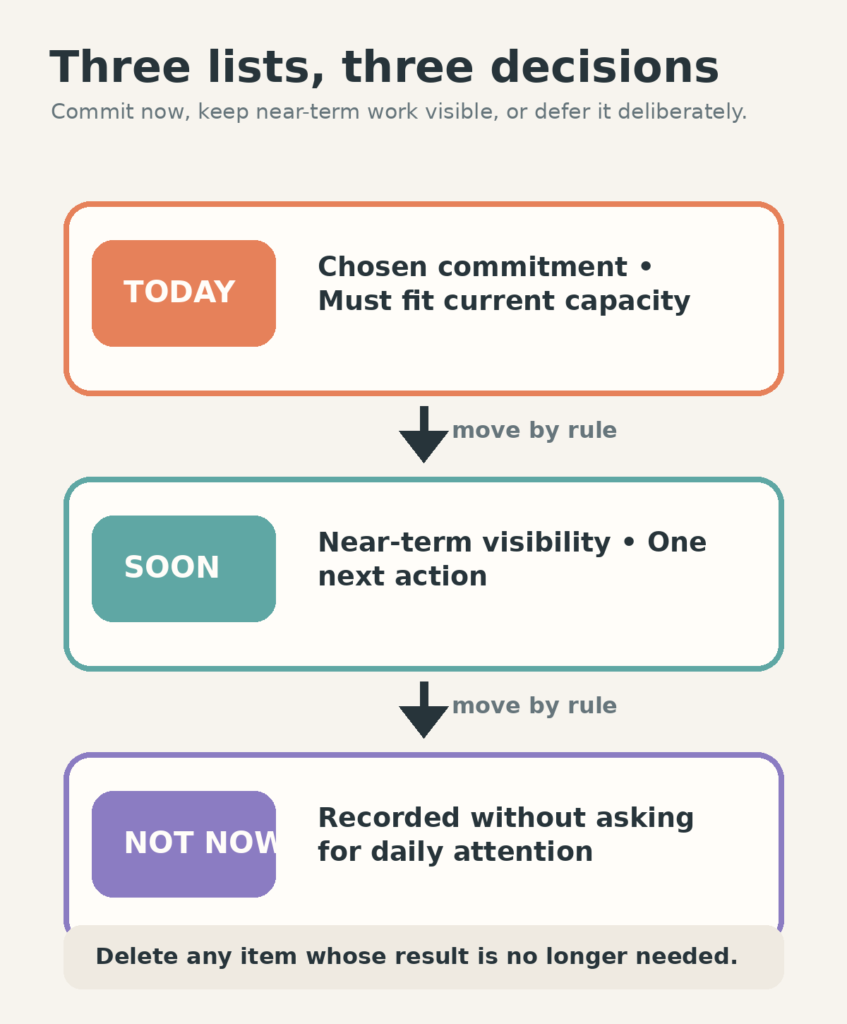
The Three-List Planning System gives each item one of three destinations: Today, Soon, or Not Now. The point is not better categorization. It is preventing every recorded task from competing for current attention.
Today is a commitment list, not a possibility list
Today holds the work you are actively choosing under the day’s real constraints. Fixed commitments belong here, along with one meaningful outcome and a small amount of supporting work that genuinely fits.
If an item appears on Today, you should be able to explain what “done enough for today” means. “Budget” is not ready. “Check July charges and send the two disputed items” is.
A practical boundary is to stop adding work when the visible list already fills the usable time. There is no universal item limit; three complex tasks can be more than ten small ones.
Soon keeps work visible without pretending it is active
Soon holds work that deserves another decision in the near term. It might include a form due next week, the next project action, errands that can share a route, or a task waiting for a specific day or person.
Soon should be reviewable at a glance. If it becomes a second master list, divide it by a simple time boundary such as “next seven days” or keep only the next visible action for each active project.
Not Now is deliberate deferral, not a punishment box
Not Now keeps useful ideas, lower-priority improvements, and tasks without a current place. Moving something here means, “I am not asking myself to decide this every day.”
Some items will later return to Soon. Some will be deleted after the reason for keeping them has passed. Both outcomes are normal.
Set up the system on one surface
Use three headings on paper, three sections in a notes app, or three saved views in a task tool you already understand. Do not change software just to obtain three columns.
- Write the three headings.
- Move fixed commitments and the day’s chosen outcome into Today.
- Place near-term decisions and next project actions in Soon.
- Move everything else you still want to keep into Not Now.
- Clarify only the Today items. The other lists do not need perfect wording yet.
If your master list contains hundreds of items, do not recopy all of them. Leave the archive where it is. Pull only the items that belong in Today or Soon; treat the rest as Not Now until they earn another review.
Move tasks by rule, not by mood alone
- Soon → Today: move an item when you can name the current action and it fits the available capacity.
- Today → Soon: move it when conditions changed but the work remains near-term.
- Today → Not Now: move it when the commitment was optional and no longer deserves near-term space.
- Not Now → Soon: move it when a date, opportunity, dependency, or deliberate choice makes it relevant.
- Any list → delete: remove it when the result is no longer needed.
Rescheduling is not automatically avoidance. It becomes a problem when the same task moves repeatedly without revealing its blocker. After the second or third move, ask whether it needs a smaller contact step, a decision from someone else, a real date, or removal.
See how one ordinary week moves through the lists
On Monday, Today contains a 10:00 appointment, send the corrected invoice, and order medication. Soon contains prepare Friday’s presentation, book the train, and call the building manager. Not Now contains reorganize the photo library and research a new desk chair.
The appointment takes longer than expected. The invoice remains Today because it has a real deadline. The medication order moves to Tuesday morning because the pharmacy is closed. Nothing is copied into a fourth “overdue” list.
On Wednesday, the presentation moves from Soon to Today as “draft the three decision slides.” The desk chair stays Not Now. The system reflects current commitment without losing the other information.
Use the lists with capacity, not against it
The three destinations decide when work deserves attention. They do not decide how much fits in a low-, normal-, or high-capacity day. For that, use the Free Capacity Day Planner or the fuller guide on planning when energy is unpredictable.
On a low-capacity day, Today may contain only fixed commitments and one protected minimum. Soon can remain unchanged. The list does not need to manufacture extra work because the day has fewer open hours.
Fix the common failure modes
Today keeps growing: require a defined outcome and a capacity check before moving anything in.
Soon becomes storage: give it a near-term boundary and keep only one visible action per active project.
Not Now never gets reviewed: look at it monthly or when choosing a new project, not every morning.
You rewrite the system constantly: stop recopying. Move the line or change its heading. A planning method should reduce clerical work.
Restart without sorting everything
If the lists have been untouched for two weeks, ignore their old positions. Capture today’s fixed commitments, choose one current outcome, and scan Soon only for a deadline or dependency that still matters. Leave Not Now alone.
That is enough to restart. The lists do not need to become accurate in every detail before they can make today clearer.
Free GentleDone resource
Overwhelmed? Start with 10 minutes.
The GentleDone 10-Minute Reset gives you one deliberately small place to begin.