
A reset routine is hardest to remember while you are standing inside the mess. The room presents ten possible tasks at once, and a useful sequence disappears behind whatever looks most urgent.
The free Home Reset Cards keep one short route in view. The set includes Kitchen, Bathroom, Entryway, Bedroom, and Shared Space cards. Each card has a Minimum route for restoring one essential function and a Standard route for a fuller reset. Download the same three-page set in US Letter or A4.
See the actual card set
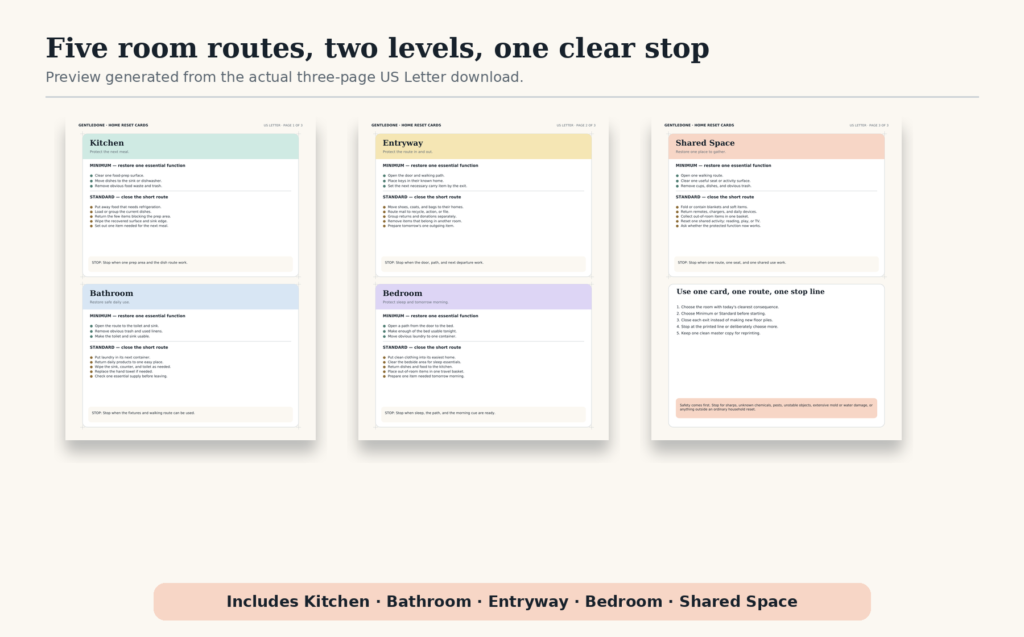
These are not whole-room cleaning checklists. They are bounded routes with a stop line. Choose one room, choose one route, and finish the exits before adding optional work.
Choose Minimum when capacity is limited
The Minimum route protects the room’s next necessary use. It is appropriate when time is short, energy is low, another commitment is approaching, or the room has slipped enough that a full routine feels difficult to enter.
Examples include clearing one food-preparation surface in the kitchen, making the toilet and sink usable in the bathroom, or opening the route from the entry door. A Minimum reset is not a failed Standard reset. It has its own finish line.
Choose Standard when the first function is already secure
The Standard route adds a small number of high-value actions around the protected function. It may include closing obvious exits, returning frequently used items, wiping a recovered surface, or preparing the room’s next use.
Standard does not mean exhaustive. Baseboards, deep sorting, repairs, and detailed projects remain separate work unless they are the actual reason the room cannot function.
Use the cards in five different rooms
Kitchen
Minimum protects one preparation surface and the sink or dishwasher route. Standard adds food put-away, obvious dish movement, a surface wipe, and preparation for the next meal. For a sink that repeatedly refills, use the GentleDone dish reset alongside the card.
Bathroom
Minimum restores safe access to the toilet and sink and removes obvious trash. Standard adds laundry, product returns, a quick surface clean, and a supply check. Stop and address leaks, sharps, unknown chemicals, bodily fluids, or significant mold with the appropriate safety guidance rather than treating them as ordinary reset tasks.
Entryway
Minimum opens the door and walking route, then places keys and the next necessary carry item where they can be found. Standard closes mail, shoes, bags, returns, and outgoing items. If the area needs a stable daily home, build an entryway launch pad.
Bedroom
Minimum makes the bed usable and opens a path to it. Standard adds clothing exits, bedside returns, and preparation for sleep or the next morning. If the path has disappeared, begin with the Floor-First Reset.
Shared space
Minimum restores one seat and a walking route. Standard adds cups, dishes, blankets, devices, toys, and out-of-room items through a single travel basket. In a shared home, agree on the protected function before adding personal standards.
Print and place one card first
- Choose US Letter or A4 for your printer.
- Print at 100% or Actual Size.
- Cut along the light crop marks, or keep the pages whole.
- Place one card where the matching reset begins.
- Use it three times before printing the rest.
A card can live inside a cabinet door, in a household binder, on a clipboard, or in a clear sleeve with a dry-erase marker. Keep it visible enough to guide the reset without turning every room into a display of instructions.
Keep the stop line intact
When the chosen route is complete, stop or deliberately choose another task. Do not let “while I am here” convert a ten-minute route into a hidden deep-cleaning project.
If you are interrupted, write the next visible action on the back or on a sticky note. “Carry dish tub to kitchen” is a better restart cue than “finish living room.”
Download the Home Reset Cards
Both files contain the same five room cards and a short use guide. Choose the page size that matches your printer.
Keep one clean master copy. If you need a wider collection of planning and reset resources, return to the GentleDone Tools Library. For an evening route that protects tomorrow without turning into a second shift, use the End-of-Day Reset.