
A useful tool should remove a decision, make a next step visible, or help you restart without rebuilding the whole system. It should not become another collection to organize.
This library is arranged by the friction you are facing today. Choose the problem first. Then open one tool, use its smallest useful version, and leave the rest of the library alone.
Choose by today’s friction
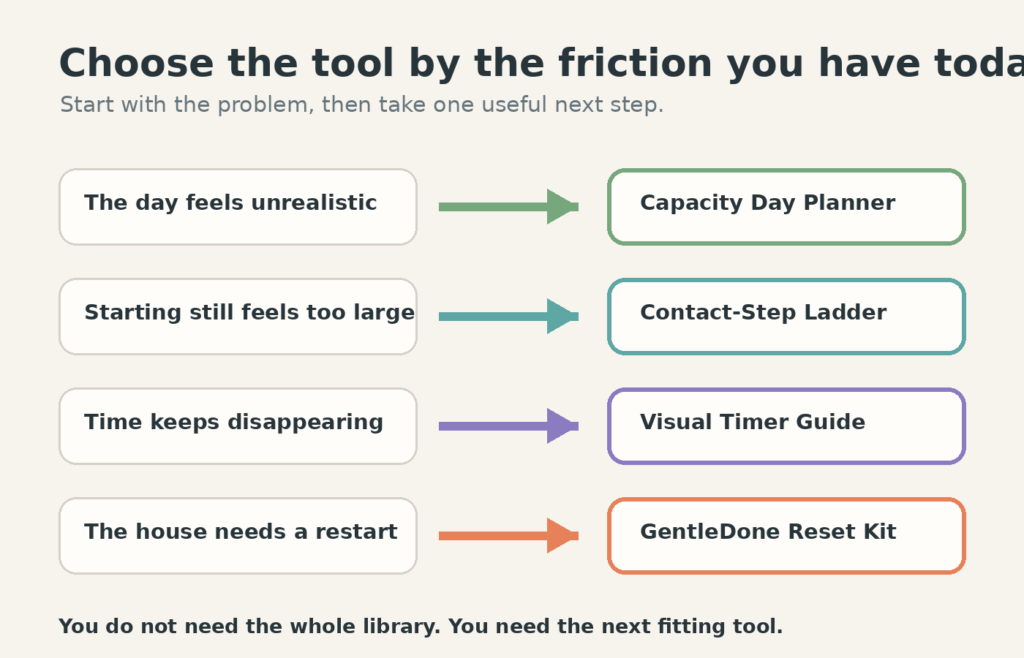
There is no correct order. A planning tool can be useful on Monday, a timer on Tuesday, and a room reset on Wednesday. The route changes because the problem changes.
When the plan no longer matches the day
Use the Free Capacity Day Planner when fixed commitments still matter but your usable time, attention, or pace is different from what you expected.
The planner keeps five things on one page:
- fixed commitments that cannot quietly disappear;
- a protected minimum for the day;
- Low, Normal, and High capacity task lanes;
- one meaningful outcome;
- a stop time and a visible handoff.
If you want the reasoning behind the three lanes, read How to Plan a Day When Your Energy Is Unpredictable. The printable is the working surface; the guide explains how to choose what belongs on it.
When the first step still does not start anything
A task can be broken down and still feel too large. “Open the report” may secretly mean find the file, choose the correct version, remember the deadline, face an unclear section, and decide what good enough looks like.
Use the Contact-Step Ladder to shrink the point of contact instead of shrinking the whole goal. The first movement might be to place the laptop on the table, open the folder, name the next question, or preview the first page.
If the difficulty appears after you have already begun, use the task-handoff method to preserve the next action before changing tasks.
When elapsed time is hard to notice
A visual timer can make the remaining block visible without asking you to calculate it repeatedly. The useful features depend on where the timer will sit, whether sound is welcome, whether interruptions need a pause button, and whether the timer must move between rooms.
The Visual Timers Compared guide checks current specifications and routes four timer styles by use case. It also explains when a free phone timer is the better choice.
When a space or routine needs a smaller reset
The GentleDone Reset Kit collects printable Minimum, Normal, and Restart cards for home, work, routines, planning, and low-capacity days. Use it when you want a ready-made route rather than another article to remember.
You can also use the existing guides directly:
- The End-of-Day Reset for closing open loops without turning the evening into a second shift.
- The Dish Reset for restoring one usable kitchen route.
- The Entryway Launch Pad for keys, wallet, bag, shoes, and outgoing items.
- The Routine Restart when missed days have created catch-up pressure.
Use the library without building a new system
- Name one friction. “Everything is messy” is too broad. “I cannot see what today can hold” or “I keep losing the first step” gives you a route.
- Choose one tool. Do not download every printable because one looks useful.
- Use the minimum version once. Test whether the tool reduces effort in the real place where the problem happens.
- Keep, adjust, or remove it. A tool that needs constant maintenance has not earned permanent space.
Saving a file is not the same as installing a system. Put the tool where the decision occurs: the planner near the morning calendar, the timer where work begins, or one reset card in the room it supports.
What GentleDone tools are designed to do
Every GentleDone tool should make its boundary clear. A printable can support planning; it cannot create more hours. A timer can show a block; it cannot decide whether the block is realistic. A reset card can restore usefulness; it does not promise a permanently perfect room.
The standard is practical: the file matches its preview, instructions remain readable when printed, the smallest version is obvious, and restarting does not require catching up. When a tool changes, the page should show its version and review date.
Know what is free and what is paid
A free tool should solve one complete, useful problem. The Capacity Day Planner does not hide its important fields behind a purchase. You can download it, print it, and use the full one-page system.
A paid product should earn its price by saving repeated setup. The Reset Kit combines several finished routes, two paper sizes, printing notes, and a personal-use license. It is not a required upgrade from the free planner, and buying it should not be presented as the only way to make a reset work.
Comparison guides have a different job. They help you decide whether a product feature fits the real use case. A buyer guide should show its review method, date checked, limitations, and disclosure before any monetized link is introduced.
How the library stays useful
Each directory entry needs a working destination, a clear best-fit problem, and an honest boundary. Download links should be tested on mobile and desktop. Product pages should stay in Draft until checkout and delivery work. Price and specification comparisons need a visible checked date.
When two tools solve the same problem, the library should explain the difference instead of listing both without direction. When a file is retired, its page should route readers to the current version rather than leaving a silent dead end.
This library will grow slowly enough for each addition to be tested. More files are not automatically more help. The next fitting tool is enough.